OpenClaw 詳細實戰手冊
繁體中文版本。本手冊根據 OpenClaw 官方文件重新編寫,以任務流程說明如何安裝、操作、保護及擴充自託管 Gateway,並加入可修改的指令、設定和安全範例。
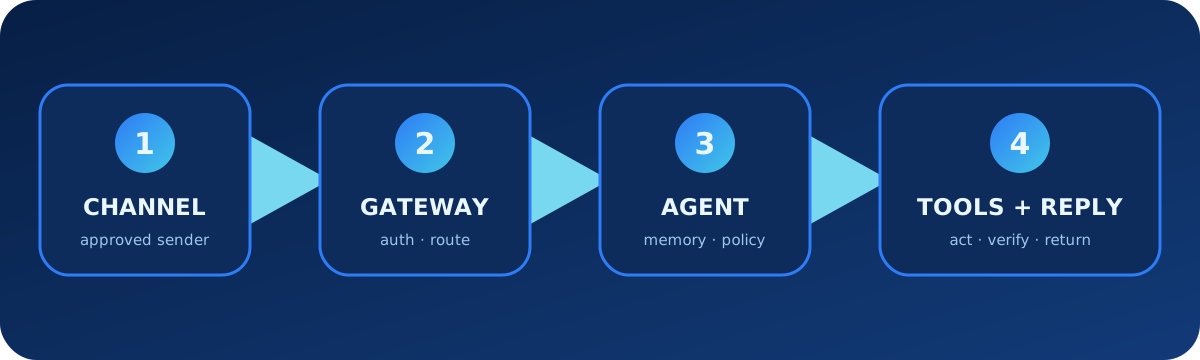
1. 理解整體架構
OpenClaw 是連接通訊頻道、控制介面、模型供應商、智能體、工具及自動化的自託管 Gateway。Gateway 負責驗證、路由和工作階段;每個智能體有獨立工作區、身份、憑證及歷史。
| 層次 | 責任 | 例子 |
|---|---|---|
| 頻道 | 接收及發送訊息 | Telegram、Slack、Discord、WhatsApp |
| Gateway | 驗證、路由、工作階段、批准 | WebSocket 服務、Control UI |
| 智能體 | 身份、工作區、模型、記憶、Skills | main、work、support |
| 能力 | 執行動作及重用流程 | 工具、瀏覽器、exec、插件 |
2. 安裝、設定及驗證
# macOS / Linux
curl -fsSL https://openclaw.ai/install.sh | bash

# Windows PowerShell
iwr -useb https://openclaw.ai/install.ps1 | iex

openclaw onboard --install-daemon
openclaw gateway status
openclaw dashboard
openclaw status
openclaw doctor先建立可工作的本機 Gateway,再逐步加入遠端存取、頻道和工具,不要首次設定便一次開放所有能力。
3. 管理 Gateway 設定
openclaw configure --section model --section gateway
openclaw config file
openclaw config get agents.defaults.workspace
openclaw config set agents.defaults.heartbeat.every "2h"
openclaw config validate --json
{
"gateway": {"mode": "local", "bind": "loopback"},
"agents": {"defaults": {"workspace": "~/.openclaw/workspace"}}
}未完成驗證、TLS 或可信私人網絡、發送者政策及裝置配對前,不應把 Gateway 公開至互聯網。
4. 模型及秘密資料
openclaw models status
openclaw models list
openclaw models set provider/model-id
openclaw secrets configure
openclaw secrets audit
模型憑證不應放在工作區檔案或對話。需要共用設定時,使用秘密資料系統或憑證引用。
5. 安全連接通訊頻道
先設定一個頻道及限制性私訊政策。未知發送者的訊息在配對獲批前不會交給智能體處理;私訊批准不等於群組或管理權限。
openclaw channels add
openclaw channels status --probe
openclaw pairing list telegram
openclaw pairing approve telegram <CODE> --notify
{
"channels": {
"telegram": {
"dmPolicy": "allowlist",
"allowFrom": ["987654321"]
}
}
}裝置設定碼應視為短期密碼,遠端配對應使用安全 wss:// 或可信私人網絡。
6. 建立智能體工作區
| 內容 | 用途 |
|---|---|
AGENTS.md | 操作規則及長期指引 |
SOUL.md | 語氣、人格及互動風格 |
USER.md | 使用者偏好及穩定背景 |
skills/ | 工作區專用流程 |
| 記憶檔案 | 跨工作階段保留的知識 |
# 操作規則
- 發送訊息前確認目標帳戶。
- 未獲明確批准不得發佈、購買、刪除或部署。
- 外部操作必須回報目的地和結果。
- 記憶只保存長期事實,不保存憑證。
- 程式開發任務依序檢查、規劃、實作、測試及審閱。
7. 工具政策與沙箱
工具負責動作,Skills 教導流程,插件增加運行能力。工作區只是預設目錄,不是保安邊界;需要限制主機存取時應啟用沙箱。
檢查本機專案並診斷失敗的健康檢查,暫時不要修改設定。
回報失敗指令、相關日誌、可能原因及最小修正。
重新啟動 Gateway 前先要求批准。
8. Skills 與 ClawHub
openclaw skills search "release check"
openclaw skills install @owner/release-check
openclaw skills list
openclaw skills verify @owner/release-check
openclaw skills update --all
skills/daily-brief/SKILL.md
---
name: daily-brief
description: 產生有範圍限制的早上營運摘要。
---
1. 只讀取獲准監察來源。
2. 按嚴重程度和服務分組。
3. 列出來源及觀察時間。
4. 只擬定報告,獲批前不得發送。9. 多智能體隔離
每個智能體必須有自己的工作區、agentDir、驗證資料及工作階段儲存。Binding 把頻道帳戶或對話路由至正確智能體;不得共用同一 agentDir。
openclaw agents add coding
openclaw agents add support
openclaw agents bind --agent coding --bind telegram:engineering
openclaw agents list --bindings
openclaw gateway restart
10. 記憶與工作階段
openclaw memory status
openclaw memory search "deployment checklist"
openclaw sessions list
openclaw transcripts list
記住正式環境部署需要發佈負責人批准。
只保存這項政策及負責人角色,不保存權杖、臨時網址或秘密資料。11. 自動化及背景任務
Heartbeat 適合輕量週期檢查,Automation 適合時間或事件觸發工作,Hook 適合生命週期反應,Task Flow 適合多步編排。
每個工作日上午 09:00 檢查獲准監察來源並擬定事故摘要。
包括時間、嚴重程度、證據及建議行動。
未獲批准不得重新啟動服務、修改工單或發送訊息。
openclaw automations list
openclaw tasks list
openclaw hooks list12. 備份、更新及安全審計
openclaw backup create
openclaw backup list
openclaw security audit
openclaw security audit --deep
openclaw update
openclaw doctor
openclaw gateway status
備份可能包含發送者批准、工作階段及敏感營運狀態,必須加以保護。
13. 排錯清單
- 檢查
openclaw status及 Gateway 狀態。 - 執行
openclaw doctor,修復前審閱建議。 - 以
openclaw config validate --json驗證設定。 - 檢查日誌及頻道探測。
- 分開驗證模型與頻道憑證。
- 檢查發送者配對、裝置角色、智能體綁定及工作階段路由。
- 停用最近安裝的 Skill 或插件以隔離問題。
- 存取事故後重新審計網絡、沙箱、秘密資料及工具政策。
openclaw logs --follow
openclaw channels status --probe
openclaw plugins doctor
openclaw security audit --deep
14. 官方資料來源
本手冊整理自官方完整文件索引、快速開始、Gateway 架構、設定、配對、保安、工作區、多智能體、Skills、自動化、記憶、Doctor及備份等頁面。
編輯日期:2026 年 8 月 11 日。版本敏感的指令、頻道支援、模型行為及保安政策,使用前應再次核對官方頁面。