OpenClaw 详细实战手册
简体中文版本。本手册根据 OpenClaw 官方文档重新编写,以任务流程说明如何安装、运行、保护和扩展自托管 Gateway,并提供可以直接调整的命令、配置和安全示例。
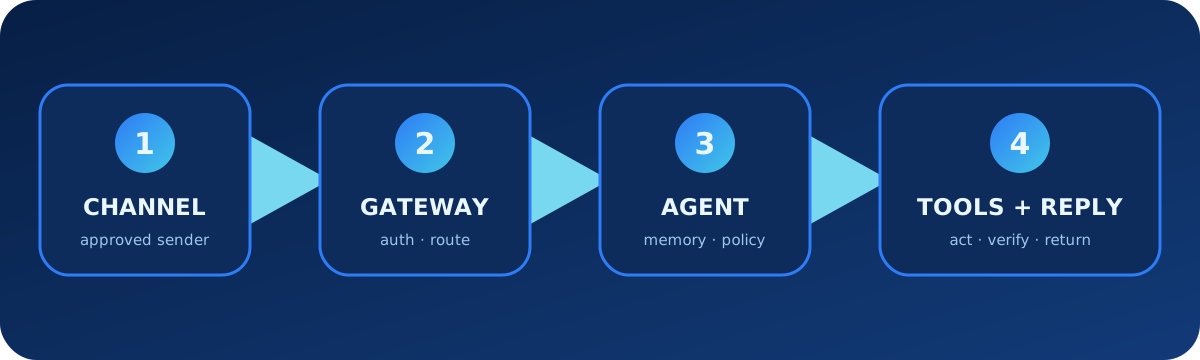
1. 理解整体架构
OpenClaw 是连接消息频道、控制界面、模型提供商、智能体、工具和自动化的自托管 Gateway。Gateway 负责认证、路由和会话;每个智能体都有独立工作区、身份、凭据和历史。
| 层级 | 职责 | 示例 |
|---|---|---|
| 频道 | 接收和发送消息 | Telegram、Slack、Discord、WhatsApp |
| Gateway | 认证、路由、会话、审批 | WebSocket 服务、Control UI |
| 智能体 | 身份、工作区、模型、记忆、Skills | main、work、support |
| 能力 | 执行动作和复用流程 | 工具、浏览器、exec、插件 |
2. 安装、配置和验证
# macOS / Linux
curl -fsSL https://openclaw.ai/install.sh | bash

# Windows PowerShell
iwr -useb https://openclaw.ai/install.ps1 | iex

openclaw onboard --install-daemon
openclaw gateway status
openclaw dashboard
openclaw status
openclaw doctor先建立可工作的本地 Gateway,再逐步添加远程访问、频道和工具,不要在首次配置时一次性开放所有能力。
3. 管理 Gateway 配置
openclaw configure --section model --section gateway
openclaw config file
openclaw config get agents.defaults.workspace
openclaw config set agents.defaults.heartbeat.every "2h"
openclaw config validate --json
{
"gateway": {"mode": "local", "bind": "loopback"},
"agents": {"defaults": {"workspace": "~/.openclaw/workspace"}}
}在认证、TLS 或可信私有网络、发送者策略和设备配对完成之前,不应把 Gateway 公开到互联网。
4. 模型和密钥
openclaw models status
openclaw models list
openclaw models set provider/model-id
openclaw secrets configure
openclaw secrets audit
模型凭据不应放进工作区文件或聊天记录。需要共享配置时,使用密钥系统或凭据引用。
5. 安全连接消息频道
先配置一个频道和限制性私信策略。未知发送者的消息在配对批准之前不会交给智能体;私信批准不代表群组或管理权限。
openclaw channels add
openclaw channels status --probe
openclaw pairing list telegram
openclaw pairing approve telegram <CODE> --notify
{
"channels": {
"telegram": {
"dmPolicy": "allowlist",
"allowFrom": ["987654321"]
}
}
}设备配置码应视为短期密码,远程配对应使用安全 wss:// 或可信私有网络。
6. 建立智能体工作区
| 内容 | 用途 |
|---|---|
AGENTS.md | 运行规则和长期指引 |
SOUL.md | 语气、人格和交互风格 |
USER.md | 用户偏好和稳定背景 |
skills/ | 工作区专用流程 |
| 记忆文件 | 跨会话保留的知识 |
# 运行规则
- 发送消息前确认目标账号。
- 未经明确批准不得发布、购买、删除或部署。
- 外部操作必须报告目标和结果。
- 记忆只保存长期事实,不保存凭据。
- 编程任务依次检查、规划、实施、测试和审阅。
7. 工具策略和沙箱
工具负责动作,Skills 教授流程,插件增加运行时能力。工作区只是默认目录,不是安全边界;需要限制主机访问时应启用沙箱。
检查本地项目并诊断失败的健康检查,暂时不要修改配置。
返回失败命令、相关日志、可能原因和最小修复。
重启 Gateway 前先请求批准。
8. Skills 和 ClawHub
openclaw skills search "release check"
openclaw skills install @owner/release-check
openclaw skills list
openclaw skills verify @owner/release-check
openclaw skills update --all
skills/daily-brief/SKILL.md
---
name: daily-brief
description: 生成范围受限的早间运营摘要。
---
1. 只读取获准的监控来源。
2. 按严重程度和服务分组。
3. 标明来源和观察时间。
4. 只起草报告,批准前不得发送。9. 多智能体隔离
每个智能体必须有自己的工作区、agentDir、认证资料和会话存储。Binding 把频道账号或对话路由到正确智能体;不得共用同一 agentDir。
openclaw agents add coding
openclaw agents add support
openclaw agents bind --agent coding --bind telegram:engineering
openclaw agents list --bindings
openclaw gateway restart
10. 记忆和会话
openclaw memory status
openclaw memory search "deployment checklist"
openclaw sessions list
openclaw transcripts list
记住生产环境部署需要发布负责人批准。
只保存这项策略和负责人角色,不保存令牌、临时网址或密钥。11. 自动化和后台任务
Heartbeat 适合轻量周期检查,Automation 适合时间或事件触发任务,Hook 适合生命周期反应,Task Flow 适合多步骤编排。
每个工作日上午 09:00 检查获准的监控来源并起草事件摘要。
包含时间、严重程度、证据和建议行动。
未经批准不得重启服务、修改工单或发送消息。
openclaw automations list
openclaw tasks list
openclaw hooks list12. 备份、更新和安全审计
openclaw backup create
openclaw backup list
openclaw security audit
openclaw security audit --deep
openclaw update
openclaw doctor
openclaw gateway status
备份可能包含发送者批准、会话和敏感运行状态,必须妥善保护。
13. 排错清单
- 检查
openclaw status和 Gateway 状态。 - 运行
openclaw doctor,修复前审阅建议。 - 用
openclaw config validate --json验证配置。 - 检查日志和频道探测。
- 分别验证模型和频道凭据。
- 检查发送者配对、设备角色、智能体绑定和会话路由。
- 禁用最近安装的 Skill 或插件以隔离问题。
- 访问事件后重新审计网络、沙箱、密钥和工具策略。
openclaw logs --follow
openclaw channels status --probe
openclaw plugins doctor
openclaw security audit --deep
14. 官方资料来源
本手册整理自官方完整文档索引、快速开始、Gateway 架构、配置、配对、安全、工作区、多智能体、Skills、自动化、记忆、Doctor和备份等页面。
编辑日期:2026 年 8 月 11 日。版本敏感的命令、频道支持、模型行为和安全策略,使用前应再次核对官方页面。