TRAE Agent & SOLO Practical Guide — Original
An independently edited, task-oriented guide based on TRAE’s official learning resources. It covers workspace context, Rules, Agent and SOLO workflows, sub-agents, MCP, Git, verification, sandboxing, privacy, and troubleshooting. Product names and UI may change; check the changelog before following an older tutorial.
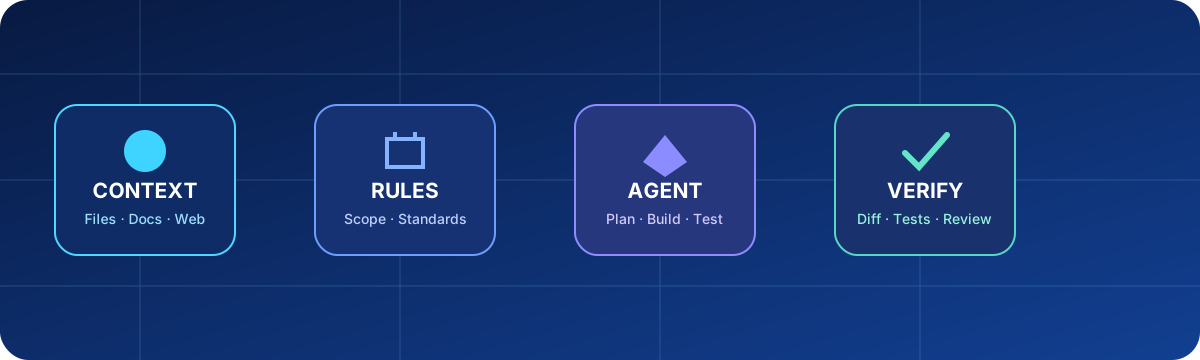
1. Choose the right TRAE surface
| Surface | Use it for | Keep control by |
|---|---|---|
| Editor + Agent | Questions, focused edits, debugging, explanations | Attach exact context and inspect each diff |
| SOLO Agent | Multi-step changes, builds, tests, Git and end-to-end delivery | Enable Plan for risky or broad tasks |
| Custom agent / sub-agent | Repeatable specialist work | Give it a narrow role and minimal tools |
| Cue | In-editor predictive edits | Accept only suggestions you understand |
Older official articles may say Builder, Builder with MCP, SOLO Builder, or SOLO Coder. Current releases have consolidated these experiences around Agent and SOLO Agent; use the labels shown in your installed version.
2. Install, sign in, and prepare a project
- Download TRAE from the official site and install the current release.
- Sign in, open a real project folder, and confirm its Git status before asking for changes.
- Let workspace indexing finish. Rebuild it from Settings → Context → Code Index Management when project-wide answers are stale.
- Add secrets, generated assets, dependencies, and irrelevant large folders to Settings → Context → Ignore Files.
- Start with a read-only request: ask TRAE to explain the stack, entry points, tests, and risks.
Give me an overview of this codebase.
Identify the runtime entry points, test commands, build command, data stores,
and files that should never contain secrets. Do not edit or run commands yet.
3. Write a task the agent can verify
State the outcome, evidence, constraints, acceptance checks, and actions that require confirmation.
Outcome: fix the login screen that stays on “Signing in”.
Evidence: reproduce at /admin with the local test account.
Scope: frontend auth state and login API client only.
Acceptance: successful login opens the dashboard; invalid credentials show an error;
refresh preserves the session; existing backend tests still pass.
Safety: do not reset the database or change production configuration.
First reproduce the bug and show the cause, then propose a plan.
4. Attach precise context with #
| Reference | Purpose | Example |
|---|---|---|
#Code | A function or class in the current file | Explain this token refresh path |
#File | One or more exact files | Compare form validation with the API schema |
#Folder | A bounded directory | Map the authentication module |
#Workspace | Project-wide retrieval | Find every caller of the login endpoint |
#Doc | Indexed local or online document set | Implement the timeout rule in the product spec |
#Web | Current web search or a supplied URL | Check the current framework migration guide |
A document set can be added by URL (TRAE crawls pages under the same path, up to the documented depth) or from supported local text files. Refresh it when the source changes and allow indexing to finish before relying on it.
#File src/auth/login.ts #File src/auth/session.ts #Doc Authentication Spec
Find why the loading state does not clear. Cite the relevant function and spec rule.
Do not inspect unrelated customer-data folders.
5. Use Plan before broad execution
In SOLO, turn on Plan for migrations, cross-module features, security work, or unfamiliar repositories. Edit the plan like a document until file scope, tests, rollback, and unresolved questions are explicit.
Plan only. Include:
1. reproduction and root-cause checks;
2. files to change and why;
3. tests to add or update;
4. migration or rollback steps;
5. questions that block safe implementation.
Wait for approval before editing.
6. Add durable Rules
Use project rules for repository conventions and user rules for stable personal preferences. Keep rules short, testable, and free of task-specific prose. Official guidance lists the priority as: user input → custom-agent prompt → user_rules.md → project_rules.md. Newer releases also support nested Rules and AGENTS.md in sub-repositories; verify the effective rule scope in your version.
# Project engineering rules
- Use pnpm; never create package-lock.json.
- Run lint and affected tests before claiming completion.
- Never edit .env, credentials, generated/, or production data.
- Ask before adding a dependency or changing a public API.
- Report created, modified, and unverified files at handoff.
7. Create focused agents and sub-agents
A TRAE agent combines a prompt with tools. Create one from Agent → Create using Smart Generate or Manual Setup; define its role, model, context, and tools. SOLO can invoke sub-agents when their descriptions match the task.
Name: Security reviewer
Role: Review the current diff for authentication, authorization, injection,
secret exposure, unsafe dependencies, and destructive operations.
Tools: repository read, diff, test runner. No deploy or external write tools.
Output: findings by severity, file references, exploit conditions, and tests.
Do not modify code unless explicitly asked.
Prefer several narrow specialists over one agent with every tool. Do not let parallel agents edit the same file without a single integration owner.
8. Connect tools through MCP
MCP can expose external data and actions to an agent. Add only a server you trust, review its command, arguments, environment variables, and tool list, then assign only required tools to the relevant agent. Keep credentials in the supported secret mechanism rather than prompts or shared config.
Safe MCP rollout checklist:
1. Verify the publisher and installation command.
2. Test read-only tools with non-sensitive data.
3. Review every write, delete, publish, or payment capability.
4. Restrict the agent role and working directory.
5. Remove tokens before exporting or sharing agent/MCP configuration.
6. Disable the server when the workflow no longer needs it.
TRAE reports scanning shared or imported agent and MCP configurations for credentials, but that is an additional safeguard—not a reason to place secrets in exportable files.
9. Let SOLO build, test, and work with Git
SOLO can implement features, refactor, write tests, run builds, review changes, update docs, and perform Git tasks. Separate code creation from version-control publishing when you need a clear approval point.
Implement the approved plan. After each logical step, run the smallest relevant test.
At the end, show git status, summarize the diff, and list tests with exact results.
Do not commit, push, switch branches, or modify remote state.
After I approve the diff: create branch feature/session-timeout, stage only the
reviewed files, commit with a concise message, then stop before push.10. Verify in the product, not only in chat
- Read the actual diff and reject unrelated changes.
- Run lint, type checks, targeted tests, and the build appropriate to the repository.
- Open the affected screen or service and exercise success, error, loading, empty, and refresh states.
- Confirm no secrets or debug data entered source control or agent context.
- Ask the agent to state what it did not verify.
Perform a delivery audit. Open the changed UI, reproduce the original failure,
test the success and error paths, inspect console/network errors, and compare the
result with every acceptance criterion. Do not report “done” from HTTP 200 alone.
11. Manage context and long sessions
Compact or reset context when switching unrelated tasks. Re-attach authoritative requirements after compaction. Use document sets for stable references, Rules for stable behavior, and the current prompt for task-specific decisions. Treat agent memory as a convenience, not the source of truth.
Before continuing, restate: current objective, confirmed decisions, changed files,
test results, open risks, and the next safe action. Flag anything inferred rather
than verified from the repository or attached documents.
12. Sandbox, approvals, and privacy
Official security guidance describes three execution modes: Sandbox with allowlist (default and recommended for most users), Manual run (confirm every command), and Auto Run (outside the sandbox and higher risk). Use manual approval for unfamiliar repositories or tools. Keep destructive commands, external writes, deployments, and credential access behind explicit confirmation.
TRAE states that code files remain on the device, while plaintext may be temporarily uploaded to compute codebase embeddings and then deleted; embeddings and metadata may be retained. Chat data may be stored and used depending on settings. Use Ignore Files and enable Privacy Mode where appropriate, and verify the current privacy policy for regulated work.
13. Troubleshooting
| Symptom | Check |
|---|---|
| Wrong or stale code answers | Rebuild code index; attach exact files; remove conflicting old context |
| Agent ignores standards | Check rule scope and priority; shorten contradictory rules |
| Command is blocked | Read the sandbox reason; approve only the exact safe command or adjust scope |
| MCP tool missing | Server process, config, credentials, tool assignment, logs, and timeout |
| SOLO loops or stalls | Stop; request a status summary; reduce scope; provide missing evidence |
| Context indexing fails | File format/size, ignore patterns, path, network, and index status |
| Unexpected usage or limits | Current plan, selected model/mode, Max mode, and official billing page |
14. Official learning path
Start with the official SOLO quickstart, context guide, Rules guide, custom Agent and MCP overview, sandbox guide, data-practices note, and the current changelog.
Editorial review: 11 August 2026. This is an independent manual, not a reproduction of TRAE’s documentation. Recheck current UI, plans, model availability, limits, data policy, and security behavior before use.