OpenClaw Field Manual — Source Edition
Adapted from the official OpenClaw documentation. This task-first guide explains how to install, operate, secure, and extend a self-hosted OpenClaw Gateway. It is an original editorial adaptation with practical commands and configuration examples, not a copy of the documentation site.
1. Understand the architecture
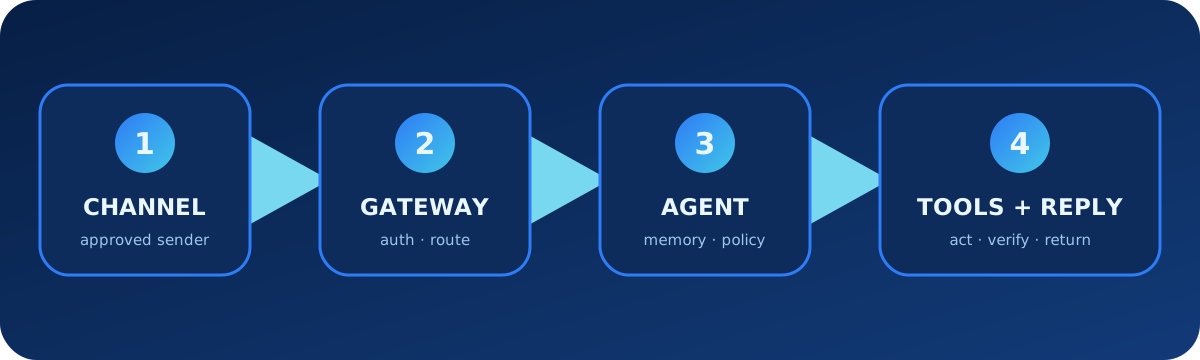
OpenClaw runs a self-hosted Gateway that connects messaging channels, control clients, model providers, agents, tools, and automation. The Gateway owns routing and sessions; each agent has a workspace, identity, credentials, and session store. Treat the Gateway as a privileged service rather than a casual chatbot process.
| Layer | Responsibility | Typical examples |
|---|---|---|
| Channels | Receive and deliver messages | Telegram, Slack, Discord, WhatsApp, Signal |
| Gateway | Authentication, routing, sessions, approvals, operations | WebSocket service and Control UI |
| Agents | Persona, workspace, model, memory, Skills, session history | main, work, support |
| Capabilities | Actions and reusable workflows | Tools, browser, exec, Skills, plugins |
2. Install, onboard, and verify
# macOS or Linux
curl -fsSL https://openclaw.ai/install.sh | bash

# Windows PowerShell
iwr -useb https://openclaw.ai/install.ps1 | iex

# Guided setup with background service
openclaw onboard --install-daemon
# Verify the service and open the Control UI
openclaw gateway status
openclaw dashboard
# Read-only health and configuration checks
openclaw status
openclaw doctorOnboarding selects a model provider, stores credentials, configures the Gateway, and can add channels or optional capabilities. Skip optional integrations during the first pass; establish a working local Gateway before expanding its network and tool surface.
3. Configure the Gateway deliberately
The main configuration is normally stored under ~/.openclaw/openclaw.json. Prefer the interactive configurator or the typed config CLI instead of editing sensitive values repeatedly by hand.
openclaw configure --section model --section gateway
openclaw config file
openclaw config get agents.defaults.workspace
openclaw config set agents.defaults.heartbeat.every "2h"
openclaw config validate --json
Small baseline example
{
  "gateway": {
    "mode": "local",
    "bind": "loopback"
  },
  "agents": {
    "defaults": {
      "workspace": "~/.openclaw/workspace"
    }
  }
}
Keep remote exposure off until authentication, TLS or a trusted overlay network, sender policy, and device pairing are understood. Validate configuration before restarting the Gateway.
4. Choose and verify model providers
OpenClaw separates providers, credentials, and model selection. Use onboarding for the first provider, then inspect the effective model and fallbacks from the CLI.
openclaw models status
openclaw models list
openclaw models set provider/model-id
openclaw models scan
Keep provider secrets out of workspace files and chat transcripts. Use the secrets system or credential references when configuration must be shared.
openclaw secrets configure
openclaw secrets audit
openclaw secrets reload
5. Connect channels without opening the door
Start with one channel and a restrictive direct-message policy. Pairing is explicit approval: unknown senders receive a temporary code, and their message is not processed until an operator approves it. DM approval does not automatically grant group access or administrative ownership.
# Add or log in to a channel, then probe it
openclaw channels add
openclaw channels status --probe

# Review and approve a Telegram sender
openclaw pairing list telegram
openclaw pairing approve telegram <CODE> --notify
Sender policy example
{
  "channels": {
    "telegram": {
      "dmPolicy": "allowlist",
      "allowFrom": ["987654321"]
    }
  }
}
Review the identity and metadata of every sender or device request. Treat mobile setup codes as temporary passwords and prefer secure wss:// or a trusted private network for remote pairing.
6. Build the agent workspace
The default workspace is typically ~/.openclaw/workspace. It can contain agent instructions, identity, user context, memory, and Skills. Keep it in a private version-controlled repository and back it up separately from secrets and mutable state.
| File or directory | Purpose |
|---|---|
AGENTS.md | Operating rules and durable working instructions |
SOUL.md | Voice, personality, and interaction style |
USER.md | User preferences and stable context |
skills/ | Workspace-specific reusable workflows |
| Memory files | Curated information that should survive sessions |
AGENTS.md example
# Operating rules
- Confirm the target account before sending a message.
- Never publish, purchase, delete, or deploy without explicit approval.
- Summarize external actions with destination and result.
- Store durable facts in memory; do not store credentials in notes.
- For coding tasks, inspect, plan, implement, test, and review the diff.
7. Use tools, policies, and sandboxing
Tools perform actions; Skills teach repeatable workflows; plugins add runtime capabilities. Start from a small tool set. A workspace is a default working directory, not a security boundary—enable sandboxing when agents must not reach the wider host.
Task prompt example
Inspect the local project and diagnose the failing health check. Do not change
configuration yet. Return the failing command, relevant log lines, likely cause,
and the smallest proposed fix. Ask before restarting the Gateway.
Operational rule
Use browser and web tools for research. Use exec only inside the assigned
workspace. Never read credential directories or send file contents to a channel
unless the user has named both the file and destination.
8. Install and create Skills
# Discover and install into the active workspace
openclaw skills search "release check"
openclaw skills install @owner/release-check
openclaw skills list
openclaw skills verify @owner/release-check

# Update installed workspace Skills
openclaw skills update --all
Minimal workspace Skill
skills/daily-brief/SKILL.md

---
name: daily-brief
description: Produce a bounded morning operations summary.
---

# Daily brief
1. Read only the approved monitoring sources.
2. Group incidents by severity and service.
3. Cite the source and observation time.
4. Draft the report; do not send it until approved.
Community Skills and plugins are executable trust decisions. Inspect their files, permissions, scripts, network destinations, and verification status before installation.
9. Run multiple isolated agents
Each agent should have its own workspace, agent directory, auth profiles, and session store. A binding routes a channel account or conversation to the correct agent. Never reuse one agentDir for several agents.
openclaw agents add coding
openclaw agents add support
openclaw agents bind --agent coding --bind telegram:engineering
openclaw agents list --bindings
openclaw gateway restart
Separation example
- coding: repository access and development Skills; no customer channel.
- support: support knowledge and ticket tools; no source-code secrets.
- main: personal assistant channel; explicit access to either specialist only when required.
10. Memory, sessions, and context
Memory should contain durable, useful knowledge rather than raw secrets or unlimited transcripts. Session history and memory are agent-scoped. Inspect what is stored, keep retrieval bounded, and use compaction when long conversations approach model limits.
openclaw memory status
openclaw memory search "deployment checklist"
openclaw sessions list
openclaw transcripts list
Memory instruction example
Remember that production deployment requires approval from the release owner.
Store only that policy and the owner role; do not store access tokens, temporary
URLs, or copied secrets.
11. Automation, heartbeats, and tasks
Use heartbeats for lightweight periodic awareness, automations for scheduled or event-triggered work, hooks for lifecycle reactions, and Task Flow for multi-step orchestration. Every autonomous job needs a bounded objective, source scope, action policy, and failure report.
Safe scheduled brief
Every weekday at 09:00, check the approved monitoring sources and draft an
incident brief. Include timestamp, severity, evidence, and recommended action.
Do not restart services, edit tickets, or send messages without approval.
openclaw automations list
openclaw tasks list
openclaw hooks list12. Back up, update, and audit
# Create and verify a backup before a risky update
openclaw backup create
openclaw backup list

# Audit the effective security posture
openclaw security audit
openclaw security audit --deep

# Update, then run health checks
openclaw update
openclaw doctor
openclaw gateway status
Back up configuration, workspace content, and SQLite state with appropriate protection. A backup can contain sender approvals, session data, and other sensitive operational state.
13. Troubleshooting checklist
- Run
openclaw statusandopenclaw gateway status. - Run
openclaw doctor; use repair options only after reviewing the proposed changes. - Validate configuration with
openclaw config validate --json. - Inspect Gateway logs and channel probes.
- Verify model credentials separately from channel credentials.
- Check sender pairing, device roles, agent bindings, and session routing.
- Disable recently installed Skills or plugins when isolating startup failures.
- Audit network exposure, sandbox policy, secrets, and tool allowlists after any access issue.
openclaw logs --follow
openclaw channels status --probe
openclaw plugins doctor
openclaw security audit --deep
14. Official source map
- Complete documentation index and getting started
- Gateway architecture, configuration, and agent workspace
- pairing, security, and multi-agent routing
- capabilities, Skills, and automation
- memory, doctor, security CLI, and backup
Editorial update: 11 August 2026. Recheck official pages before relying on version-sensitive commands, channel support, provider behavior, or security policy.