Cursor Agent Practical Guide — Original
An independently edited guide based on Cursor’s official documentation. It covers local Agent modes, surgical context, Project Rules, terminal controls, MCP, review, CLI, cloud agents, privacy, and troubleshooting.
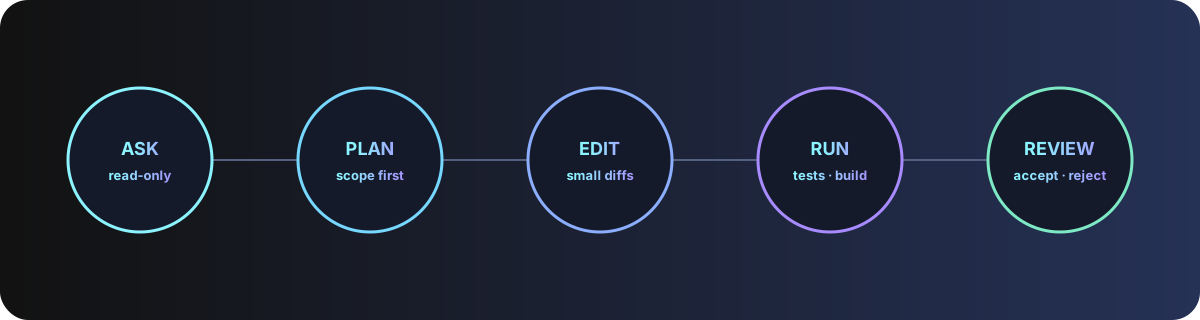
1. Pick a mode by risk
| Mode | Best for | Capabilities |
|---|---|---|
| Ask | Learning, diagnosis, planning | Read-only search |
| Agent | Multi-file features and fixes | Search, edit, terminal and error repair |
| Manual | Exact, bounded edits | Only selected files |
| Custom | Repeatable specialist workflows | Selected tools and instructions |
Begin unfamiliar work in Ask. Move to Agent only after the objective, scope, tests, and prohibited actions are clear. Use the mode picker or Ctrl+.; open Agent with Ctrl+I.
2. Prepare and index the repository
- Open the project root and inspect Git status.
- Wait for codebase indexing; check the indexing status when project-wide retrieval is incomplete.
- Use
.gitignoreand.cursorignoreto exclude dependencies, generated output, secrets, private datasets, and unrelated archives. - Ask for a read-only map before editing.
In Ask mode, map this repository: entry points, architecture boundaries,
build and test commands, data stores, deployment files, and high-risk areas.
Do not edit files or run commands.
3. Give surgical context with @
Cursor can gather context automatically, but precise references reduce irrelevant retrieval: use @code for a symbol, @file for an exact file, @folder for a bounded module, and a web/document reference for authoritative external material.
@file:src/auth/session.ts @file:src/api/login.ts @code:refreshSession
Reproduce why the UI stays in loading state. Cite the exact control path.
Do not inspect or change billing and customer-export modules.
4. Write a verifiable task and plan
Outcome: successful login must open /admin.
Acceptance: invalid password shows an inline error; loading always clears;
refresh keeps a valid session; existing tests pass.
Constraints: no database reset, dependency upgrade, or production change.
First produce a plan with affected files, tests, risks, and rollback.
Wait for approval before editing.
For broad changes, keep planning separate from implementation. A cloud agent is most effective after a detailed plan exists.
5. Encode standards with Project Rules
Store version-controlled rules as MDC files in .cursor/rules. Rule types include Always, Auto Attached by glob, Agent Requested by description, and Manual via @ruleName. Nested rule folders can scope standards to monorepo components. User Rules apply globally; legacy .cursorrules is deprecated.
---
description: Authentication module safety and testing
globs: ["src/auth/**", "tests/auth/**"]
alwaysApply: false
---
- Never log tokens or passwords.
- Preserve the public session schema.
- Run auth unit tests and the login browser test.
- Ask before adding a dependency or changing database migrations.
- Reference @tests/auth/session.test.ts for test style.
Generate reusable rules from a mature conversation with /Generate Cursor Rules, then edit the result. Keep rules focused, concrete, and short.
6. Control tools, terminal, and MCP
Agent tools cover search, file reading, editing, deletion, terminal execution, web access, Rules, and configured MCP servers. Custom modes can disable unnecessary tools. Review commands before they run; turn off Auto-run for unfamiliar code or high-risk work.
Implement the approved plan. You may edit the listed files and run targeted tests.
Ask before deletion, dependency installation, migrations, network access, Git commit,
or any command outside the repository. Never read .env or credential files.
For MCP, verify the publisher and transport, keep secrets outside committed config, inspect the exposed tool list, test read-only access first, and require approval for writes or external messages.
7. Review changes and verify behavior
- Open Review changes and inspect every addition and deletion.
- Reject unrelated formatting or broad rewrites.
- Run the repository’s lint, type checks, targeted tests, and build.
- Open the affected UI and exercise success, failure, loading, empty, and refresh states.
- Check Git status and confirm sensitive files are absent.
Audit the delivery against every acceptance criterion. Show the exact commands and
results, list modified files, and state what was not verified. Do not infer success
from an HTTP status or the agent’s summary; exercise the actual interface.
8. Use Cursor CLI safely
# Install using the current command shown in official docs
curl https://cursor.com/install -fsS | bash

# Interactive session
cursor-agent
cursor-agent "explain the authentication module; do not edit"

# Non-interactive review
cursor-agent -p "review these changes for security issues" --output-format text

# Resume work
cursor-agent ls
cursor-agent resume
In automation, use explicit output formats, bounded prompts, a restricted environment, and a non-mutating review task by default. Pin and audit any workflow that can write or publish.
9. Delegate to Cloud Agents
Cloud Agents run remotely and can be started from Cursor, web/mobile, or supported integrations. Connect only the intended repository, provide environment setup, use a dedicated branch, and review the resulting changes before merge. Current releases support reusable cloud environment snapshots, local/cloud handoff, and isolated cloud sub-agents such as /in-cloud; /babysit can monitor a pull request.
On a new branch, implement only the approved plan. Run the documented tests.
Do not merge, deploy, change repository settings, or access production secrets.
Return a diff summary, evidence, remaining risks, and a pull request for review.
10. Privacy and security boundaries
Select the appropriate Privacy Mode under Cursor settings. Cursor states that AI requests route through its backend; codebase indexing uploads chunks to compute embeddings, while plaintext retention depends on privacy settings and embeddings plus obfuscated metadata may be stored. Excluding a path is a best-effort safeguard, so do not open highly sensitive repositories without organisational approval and current policy review.
- Never place secrets in prompts, Rules, terminal history, logs, or MCP config.
- Disable indexing or exclude files that must not enter AI context.
- Keep destructive commands, external writes, commits, pushes, merges, and deployments behind approval.
- Review cloud-agent repository, branch, environment, and integration permissions.
11. Troubleshooting
| Problem | Check |
|---|---|
| Agent misses relevant code | Index status, .cursorignore, exact @ references, workspace root |
| Rule does not apply | Rule type, description, glob, nested scope, manual mention |
| Terminal uses wrong shell | Command Palette → Terminal: Select Default Profile |
| MCP tool is absent | Server process, config, credentials, enabled tools, logs |
| Edits loop or expand scope | Stop, return to Ask/Plan, reduce context and acceptance scope |
| Cloud agent cannot test | Environment snapshot, setup script, secrets, network and service dependencies |
12. Official sources
This guide draws on Cursor’s official pages for Agent modes, tools, Rules, context, CLI, web and mobile agents, privacy, and the changelog.
Editorial review: 11 August 2026. This independent manual is not a copy of Cursor documentation. Recheck current modes, models, plans, limits, commands, security controls, and data policy.