Codex Field Manual — Source Edition
Adapted from the official OpenAI documentation. This source edition reorganizes the linked Codex guides into a task-first manual for Global Infinity. It is an editorial adaptation, not a mirror of the source website. Examples are rewritten so readers can copy, adjust, and run them.
1. Choose the right Codex surface
| Surface | Best for | Start here |
|---|---|---|
| ChatGPT desktop app | Planning, reviewing changes, parallel chats, browser checks, and long-running tasks | Open a project or folder, then start a Codex chat |
| Codex CLI | Terminal-first repository work, scripts, local inspection, and automation | codex |
| IDE extension | Focused edits with open files and selections as context | Open the Codex panel in your editor |
| Codex cloud | Delegated tasks in an isolated hosted environment | Connect a repository and define its setup |
2. Quick start
- Open the repository, not a random parent directory.
- Ask Codex to inspect before changing anything.
- State the outcome and the evidence required for completion.
- Review the diff and run the relevant checks.
CLI example
# Install with npm, then start an interactive session
npm install -g @openai/codex
cd ~/projects/example-app
codex

# Useful interactive commands
/init
/status
/permissions
/model
/review
Practical rule: begin with a small real task—such as tracing one bug or adding one test—before delegating a repository-wide change.
3. Write prompts Codex can finish
A reliable request has four parts: the goal, relevant context, constraints, and a visible definition of done. Give paths, commands, screenshots, logs, or failing tests when they materially narrow the task.
Weak request
Fix the settings page.Task-ready request
Goal: Fix the profile form so a saved display name survives a reload.

Context:
- UI: src/pages/Profile.tsx
- API: src/api/profile.ts
- Reproduction: save a name, refresh, and the old value returns

Constraints:
- Keep the current API contract
- Do not add a state-management dependency
- Preserve unrelated edits

Done when:
- The reproduction no longer fails
- Relevant tests pass
- Summarize the cause and changed files
Planning example
Inspect the authentication flow and produce a short implementation plan.
Do not edit files yet. Identify assumptions, risky migrations, and the tests
that should prove the change. Wait for my approval before implementation.
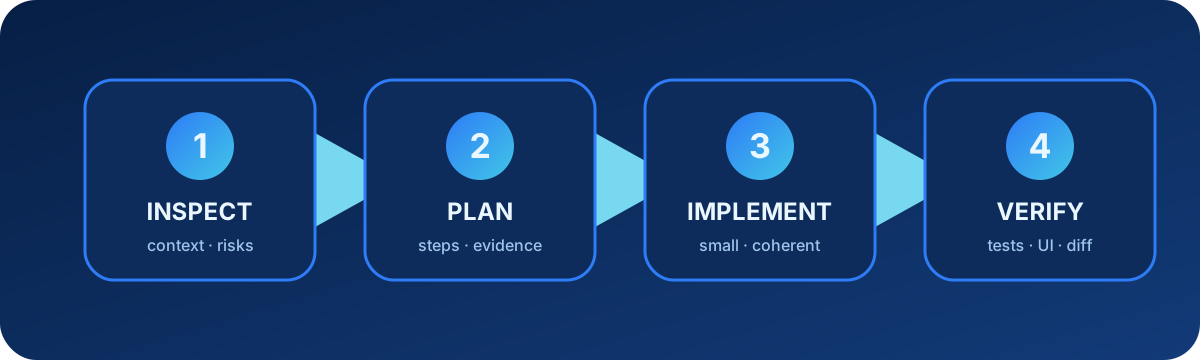
4. Use an inspect → plan → implement → verify loop
- Inspect: locate entry points, conventions, tests, and current working-tree changes.
- Plan: split risky or multi-file work into verifiable steps.
- Implement: make the smallest coherent change while preserving unrelated work.
- Verify: run targeted checks, inspect the resulting page or output, and review the diff.
Verification prompt
Run the smallest relevant test set first. If it passes, run the broader suite.
For the UI, open the changed flow and verify the actual rendered content—not
only the HTTP status. Report any check you could not run and why.
5. Give Codex durable repository guidance
Use AGENTS.md for conventions that should apply repeatedly in a repository. Keep it short and operational: build commands, test commands, directory ownership, formatting rules, and review expectations. A more specific file deeper in the tree can refine guidance for that subtree.
AGENTS.md example
# Repository guide

## Commands
- Install: npm ci
- Unit tests: npm test
- UI checks: npm run test:e2e
- Lint: npm run lint

## Working rules
- Preserve user edits outside the requested scope.
- Use the existing design tokens in src/styles/tokens.css.
- Add or update a regression test for every bug fix.
- Before handoff, report changed files and commands actually run.
6. Configure model, approvals, and sandbox boundaries
Codex can read, edit, and run commands within the permissions available to the session. Treat approvals as a boundary: start with the least access that completes the task, and expand only for a specific reason such as installing a dependency or reaching an external service.
Project configuration example
# .codex/config.toml
approval_policy = "on-request"
sandbox_mode = "workspace-write"

[sandbox_workspace_write]
network_access = false
Permission request example
I need network access to download the locked dependencies used by this project.
Allow: npm ci
Scope: this repository only
Afterward: I will run the unit tests and report the result.
7. Extend Codex with Skills, plugins, and MCP
| Extension | Use it when | Typical contents |
|---|---|---|
| Skill | A workflow should be reusable and teachable | SKILL.md, references, scripts, assets |
| Plugin | A capability should be installed as a bundle | Skills, tools, commands, MCP, apps, assets |
| MCP | Codex needs authorized live data or actions | A server connection and tool definitions |
Minimal skill example
my-skill/
└── SKILL.md

---
name: release-check
description: Verify a web release before deployment.
---

# Release check
1. Run unit and integration tests.
2. Build the production bundle.
3. Check the primary user flow in a browser.
4. Report blockers; do not deploy without an explicit request.
MCP configuration example
[mcp_servers.docs]
command = "npx"
args = ["-y", "@example/docs-mcp"]

[mcp_servers.docs.env]
DOCS_SPACE = "engineering"
Use authenticated connectors for private workspace data. Web search is not a substitute for an authorized private source.
8. CLI workflows and non-interactive runs
One-shot task
codex exec "Inspect the failing checkout tests, fix the smallest root cause, run the targeted tests, and summarize the diff."Machine-readable CI run
codex exec --json \
  "Review the current changes for correctness and security. Do not edit files." \
  > codex-review.jsonl
Resume context
codex resume --lastIn automation, make the working directory, allowed actions, expected output, and failure behavior explicit. Never assume an unattended run should receive broad permissions.
9. IDE, desktop, browser, and cloud patterns
Focused IDE edit
Using the selected function and its tests, remove the duplicate network request.
Keep the public function signature. Show the proposed diff before changing callers.
Browser verification
Open the local admin page. Log in with the development account, navigate to the
tool editor, and verify that all four rich-text cards load. Check visible headings,
editable content, image controls, and console errors. A 200 response alone is not proof.
Cloud delegation
In an isolated cloud environment, update the dependency and run the full test suite.
Do not publish or merge. Return the patch, compatibility notes, and test evidence.
10. Review code as a separate task
Ask for findings first, ordered by impact and linked to concrete files or lines. A good review checks behavior, security, data loss, regressions, missing tests, and assumptions—not only style.
Review the changes against main.
Prioritize correctness, security, and regressions.
For each finding include severity, file and line, failure scenario, and a concise fix.
If there are no findings, say so and list remaining test gaps.
11. Worktrees, parallel chats, and long-running work
A Git worktree gives each parallel task its own checkout while sharing repository metadata. Use it when two tasks may edit overlapping files or need independent branches. Use a local chat when the task must immediately see uncommitted local changes.
Parallel task split
| Worktree A | Worktree B | Local checkout |
|---|---|---|
| Upgrade the API client and tests | Refresh UI error states | Integrate, inspect conflicts, and run end-to-end tests |
Long-running task brief
Objective: migrate the test suite in three checkpoints.
Checkpoint 1: inventory and risk map.
Checkpoint 2: migrate one representative module and verify it.
Checkpoint 3: finish remaining modules and run the full suite.
After each checkpoint, summarize progress and blockers. Do not deploy.
12. Remote work and scheduled tasks
Remote access lets you continue supported Codex work away from the original machine; scheduled tasks are for recurring checks. Both still inherit the task’s authorization boundaries. A schedule is appropriate for a repeatable, observable job—not for an ambiguous product decision.
Scheduled-task example
Every weekday at 09:00, inspect dependency alerts in this repository.
Create a short report with package, severity, affected version, and recommended action.
Do not install packages, open pull requests, or message external users.
13. Troubleshooting checklist
- Confirm the selected project or working directory.
- Check the visible error, terminal output, and relevant logs.
- Run
/statusand inspect model, permissions, and sandbox state. - Verify authentication and account/workspace access separately from API-key access.
- For plugin or MCP failures, check installation, enabled state, authorization, configuration, restart requirements, and workspace policy.
- For a stuck UI, inspect the rendered page and browser console; do not rely on status code alone.
- Reproduce with the smallest task before widening permissions or changing global configuration.
Diagnostic request
Diagnose only; do not modify files.
Reproduce the issue, capture the exact failing step, inspect the nearest logs and
configuration, and identify the most likely root cause with supporting evidence.
Separate confirmed facts from hypotheses.
14. Official source map
This manual was adapted from linked OpenAI documentation pages, including:
- Codex documentation home and complete documentation index
- Best practices, prompting, and projects and chats
- CLI, IDE extension, desktop app, and cloud
- approvals and security, configuration, and AGENTS.md
- Skills, plugins, and MCP
- code review, worktrees, long-running work, and non-interactive mode
- browser, scheduled tasks, remote, and troubleshooting
Editorial update: 11 August 2026. Recheck the linked official pages before relying on version-sensitive commands, model names, availability, or policy.