Claude Code Field Manual — Source Edition
Adapted from Anthropic’s official Claude Code documentation. This source edition reorganizes the linked learning pages into a task-first manual for Global Infinity. It is an original editorial guide rather than a copy of the documentation site, with practical commands, configurations, prompts, and workflows readers can adapt.
1. What Claude Code is and where to use it
Claude Code is an agentic development tool that can inspect a codebase, edit files, run commands, and connect to development tools. Choose the surface that matches the work rather than forcing every task through one interface.
| Surface | Best for | Typical starting point |
|---|---|---|
| Terminal CLI | Full repository work, shell commands, scripts, and automation | claude |
| VS Code / JetBrains | Focused edits, selections, inline diffs, and plan review | Open the Claude Code panel in the project |
| Desktop | Parallel sessions, visual diffs, previews, and integrated tools | Create a Code session for a folder |
| Web / mobile | Cloud tasks against a connected GitHub repository | Start at claude.ai/code |
2. Install and start safely
Recommended native install
# macOS, Linux, or WSL
curl -fsSL https://claude.ai/install.sh | bash

# Homebrew stable channel
brew install --cask claude-code

# Windows with WinGet
winget install Anthropic.ClaudeCode
First project
cd ~/projects/example-app
claude

# Useful health and authentication checks
claude doctor
claude auth status --text
Launch Claude Code from the repository or package you want it to understand. Starting too high in the filesystem gives it noisy context; starting too deep can hide project-level instructions.
3. Give Claude a finishable task
A strong request states the outcome, the relevant context, constraints, and proof of completion. For unfamiliar or risky work, separate exploration and planning from implementation.
Weak prompt
Fix checkout.Task-ready prompt
Goal: stop duplicate orders when a customer retries payment.

Context:
- Checkout handler: src/checkout/submit.ts
- Payment client: src/payments/client.ts
- Reproduction: two requests with the same idempotency key create two orders

Constraints:
- Keep the public API response unchanged
- Reuse the existing transaction helper
- Do not modify unrelated formatting

Done when:
- Add a regression test for concurrent retries
- The targeted checkout tests pass
- Explain the root cause and summarize changed files
Plan-first prompt
Explore the authentication and session-refresh flow. Do not edit files yet.
Map the request path, identify race conditions and security boundaries, then
propose a short plan with tests and rollback considerations. Wait for approval.
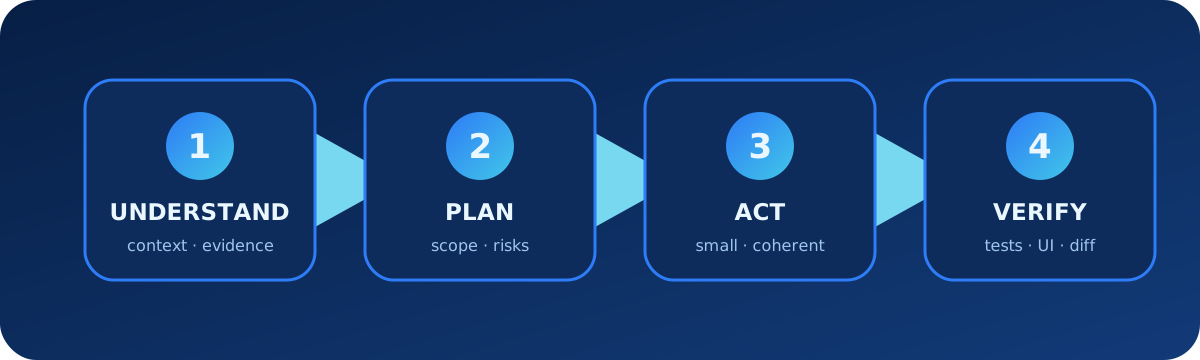
4. Use the agentic loop deliberately
- Gather context: ask Claude to find entry points, related tests, local conventions, and current changes.
- Choose an approach: use plan mode for ambiguous, architectural, or high-risk changes.
- Act: keep the implementation coherent and scoped.
- Verify: run tests, inspect real output, and review the diff before completion.
Explore an unfamiliar repository
Give me a guided map of this repository. Identify the runtime entry points,
main data flow, test strategy, configuration layers, and the three files I
should read first. Cite file paths; do not change anything.
Debug with evidence
Reproduce the reported timeout before proposing a fix. Trace one failing request,
inspect the nearest logs and tests, and separate confirmed facts from hypotheses.
Make the smallest fix only after the root cause is supported by evidence.
Verification brief
Run the smallest relevant checks first, then the broader suite if they pass.
For UI changes, open the actual flow and verify visible content, interactions,
responsive layout, and console errors. Do not treat HTTP 200 as visual proof.
5. Manage context instead of fighting it
Claude Code’s context contains the conversation, tool results, files, instructions, skills, and other loaded material. Keep one session focused on one coherent objective. Use a fresh session when the objective changes, and compact long sessions with an explicit focus.
/context
/compact Preserve the accepted plan, changed files, failing test, and next action.
/clear
Use @path/to/file or IDE selections to point at high-value context. Avoid asking Claude to read a whole repository when a few entry points and failing tests can establish the task.
6. Store durable guidance with CLAUDE.md
CLAUDE.md contains instructions written by the team; auto memory contains learnings Claude records across sessions. Instructions guide behavior but are not a hard security control. Put enforced restrictions in settings, permissions, sandbox policy, or hooks.
Project CLAUDE.md example
# Project guide

## Commands
- Install: npm ci
- Unit tests: npm test
- End-to-end tests: npm run test:e2e
- Lint: npm run lint

## Architecture
- HTTP handlers live in src/api/handlers/.
- Business rules belong in src/domain/ and must not import UI modules.

## Delivery rules
- Preserve user changes outside the task.
- Add a regression test for every bug fix.
- Never deploy or push unless explicitly requested.
- Report the commands actually run before handoff.
Initialize and inspect memory
/init
/memory
/context
Path-scoped rule
---
paths:
  - "src/api/**/*.ts"
---

# API rules
- Validate every external input.
- Use the shared error response helper.
- Add an integration test for authorization boundaries.
If the repository already uses AGENTS.md, a short CLAUDE.md can import it with @AGENTS.md and add Claude-specific guidance below.
7. Configure settings, permissions, and sandboxing
Claude Code merges settings from managed, user, project, and local layers. Commit team-safe project settings; keep personal or machine-specific settings in the local file. Permission rules can allow, ask, or deny tools and command patterns.
Project settings example
{
  "permissions": {
    "allow": [
      "Bash(npm test:*)",
      "Bash(npm run lint:*)"
    ],
    "deny": [
      "Read(./.env)",
      "Read(./secrets/**)"
    ]
  },
  "sandbox": {
    "enabled": true
  }
}
Permission modes
| Mode | Use | Caution |
|---|---|---|
| Default | Normal work with approval prompts | Review unfamiliar commands carefully |
| Plan | Research and design without implementation | Use it to agree on scope before edits |
| Accept edits | Trusted editing workflow | Commands can still require approval |
| Bypass permissions | Only inside a separately isolated environment | Do not use casually on a normal workstation |
The Bash sandbox can restrict filesystem and network access while allowing more autonomous command execution. Sandbox policy and permission rules are complementary, not interchangeable.
8. Package repeatable work as Skills
A Skill is appropriate when a multi-step workflow should be reusable, discoverable, and shareable. Keep the main instructions focused and move large references or scripts into supporting files.
Minimal Skill
.claude/skills/release-check/
└── SKILL.md

---
name: release-check
description: Validate a web release before deployment.
---

# Release check
1. Run unit and integration tests.
2. Build the production bundle.
3. Inspect the primary flow in a browser.
4. Summarize risk and blockers.
5. Do not deploy unless the user explicitly requests it.
Use a Skill for a workflow; use CLAUDE.md for durable repository facts; use a hook when an action must run mechanically.
9. Delegate focused work to subagents
Subagents have their own context and can be restricted to particular tools. They are useful for independent research, review, testing, or specialist analysis. Give each one a bounded output that the main session can evaluate.
Custom reviewer subagent
---
name: security-reviewer
description: Review changed code for exploitable security defects.
tools: Read, Grep, Glob, Bash
model: inherit
---

Review only the changed code and its reachable data flows.
Return findings ordered by severity with file, line, exploit scenario,
evidence, and a minimal remediation. Do not edit files.
Delegation prompt
Use the security-reviewer subagent to inspect the current diff while you run
the targeted tests. Reconcile its findings with test evidence before reporting.
10. Automate guardrails with Hooks
Hooks run around Claude Code events. Typical uses include formatting after edits, blocking dangerous commands, validating files, recording audit events, or notifying a user when a task completes. Test hook commands independently before relying on them.
Format edited JavaScript and TypeScript files
{
  "hooks": {
    "PostToolUse": [
      {
        "matcher": "Write|Edit",
        "hooks": [
          {
            "type": "command",
            "command": "npx prettier --write \"$CLAUDE_FILE_PATH\""
          }
        ]
      }
    ]
  }
}
Hooks can enforce behavior more reliably than conversational instructions, but a faulty hook can interrupt every session. Keep matchers narrow and failure messages actionable.
11. Connect live systems with MCP and plugins
MCP connects Claude Code to external tools and data. Plugins bundle reusable components such as Skills, subagents, hooks, and MCP configuration. Prefer authenticated connectors for private systems and grant only the capabilities needed for the workflow.
Add and inspect an MCP server
claude mcp add --transport http project-docs https://mcp.example.com
claude mcp list

# Inside a session
/mcp
Install a plugin from a marketplace
/plugin marketplace add example-org/claude-plugins
/plugin install code-review@example-marketplace
Before installing, inspect the plugin’s source, requested tools, hook commands, and MCP destinations. A plugin executes with the permissions available to Claude Code.
12. Manage sessions and parallel work
Continue, resume, name, and branch
claude --continue
claude --resume
claude --resume auth-refactor

# Inside a session
/rename auth-refactor
/branch try-streaming-approach
Use session names when several tasks run in parallel. Branch a conversation to explore another approach without losing the original. Do not resume the same session in two terminals unless interleaved transcript writes are intentional.
Isolated worktree session
claude --worktree dependency-upgrade

# Ask one session to update dependencies while another reviews UI changes.
# Integrate and run end-to-end tests from the primary checkout.
13. Script Claude Code and use it in CI
One-shot command
claude -p "Review the current diff for correctness and security. Do not edit files."Structured output
claude -p \
  --output-format json \
  "Run the targeted tests and return a concise failure summary." \
  > claude-result.json
Process piped input
git diff main --name-only | claude -p \
  "Identify the changed files that need security review and explain why."
GitHub Actions setup
# Run inside a repository session
/install-github-app
In unattended automation, define allowed tools, maximum cost or turns, output format, and failure behavior. Never give a CI job broader repository or secret access than the task requires.
14. Browser, desktop, web, and remote workflows
Browser test prompt
Open the local application in Chrome, reproduce the failed checkout, inspect
the visible UI and console, then verify the fix at desktop and mobile widths.
Do not submit real payments or modify production data.
Claude Code can also work through VS Code, JetBrains, Desktop, web, mobile, and Remote Control. Cloud tasks use isolated infrastructure and a connected repository; local sessions can see local files and tools. Choose based on data location and required access.
15. Troubleshooting checklist
- Run
claude doctorfor installation and settings diagnostics. - Use
claude auth status --textto separate login problems from project problems. - Run
/contextto confirm the expected CLAUDE.md, rules, Skills, and context are loaded. - Run
/permissions,/hooks, or/mcpto inspect the relevant subsystem. - Check project and local settings for invalid JSON or conflicting layers.
- Reproduce with plugins and MCP servers disabled when diagnosing startup or tool failures.
- Use a fresh focused session if compaction or accumulated context is obscuring the task.
- Capture the exact command, error, version, operating system, and smallest reproduction before changing global configuration.
Diagnostic prompt
Diagnose only; do not change files or settings. Reproduce the issue, capture the
exact failing step, inspect the active configuration and nearest logs, and rank
possible causes by evidence. Clearly label confirmed facts and hypotheses.
16. Official source map
- Complete Claude Code documentation index, overview, and quickstart
- How Claude Code works, common workflows, and best practices
- CLAUDE.md and memory, settings, permissions, and sandboxing
- Skills, subagents, Hooks, MCP, and plugins
- sessions, worktrees, programmatic use, and GitHub Actions
- Chrome integration, CLI reference, and troubleshooting
Editorial update: 11 August 2026. Check the linked official pages again before relying on version-sensitive commands, plan availability, model behavior, or policy.